How do I convert averageSessionDuration to display in minutes and seconds format?
Last updated: April 20, 2026
Context
When working with Google Analytics data in Adverity, the averageSessionDuration metric comes in seconds format. You may want to display this data in a more readable HH:MM:SS format in your dashboards and KPI widgets.
Answer
To convert averageSessionDuration to a readable time format, you'll need to create a transformation and then use a calculated KPI for display purposes.
Step 1: Prepare the field
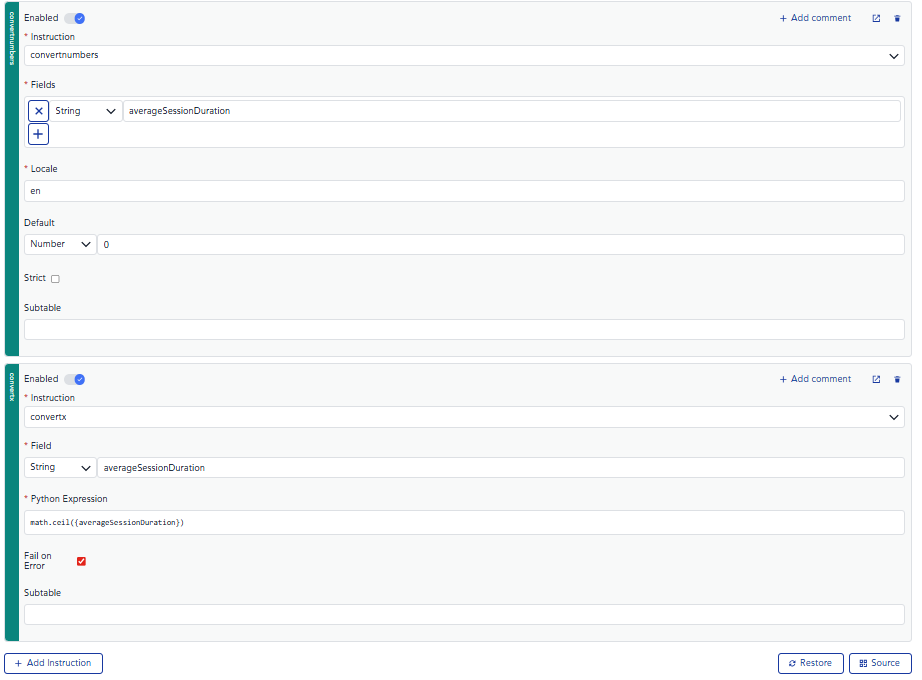
Set field type to Long (instead of Duration) for your metric. If the number is a float convert it to int with the following script:
Step 2: Create a Calculated KPI
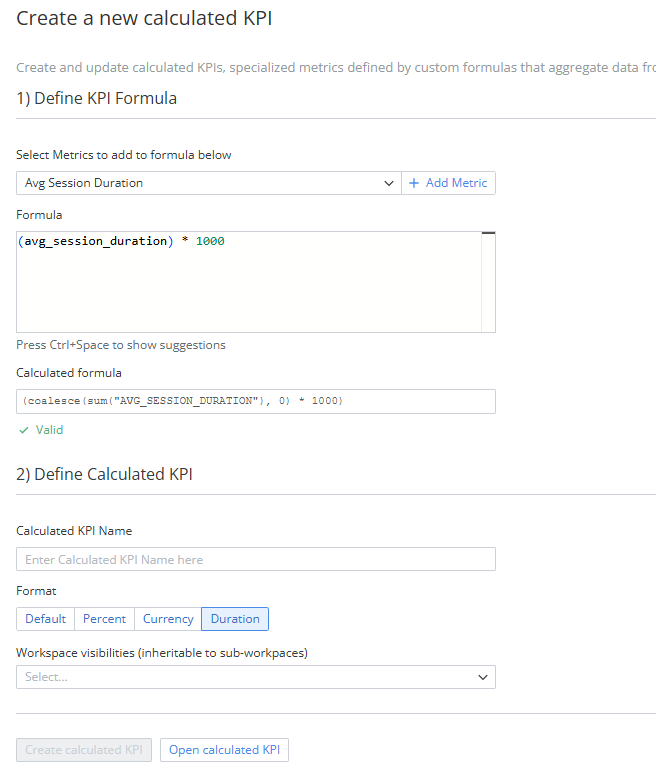
After applying the transformation and laoding the data, create a calculated KPI that formats the duration data into HH:MM:SS format. This calculated KPI should be used in your widgets instead of the raw averageSessionDuration field.
Multiply it by 1000 (as currently, insights is seeing the values of duration as milliseconds) and set duration as a format.
Step 3: Display in Widgets
Use the calculated KPI (e.g., "Average Duration") in your dashboard widgets to display the session duration in the desired MM:SS format.